 SnappyMemo
A menu bar app for your Mac
Catch every thought
in two seconds.
Press one shortcut in any app, type, press Return. SnappyMemo saves the note together with the web page you were on, and you're straight back to work.
Free for 30 days, then $2.99 once · no subscription · macOS 14 Sonoma or later · Apple silicon and Intel
The panel opens on top of whatever you're doing. The page you were reading is filled in for you.
Sound familiar?
I read something useful last week. Now I can't remember where.
By the time I've opened a notes app and found the right page, the thought is gone.
My notes live in sticky notes, emails to myself and forty open tabs.
SnappyMemo gives every thought one place, one shortcut, and enough context to understand it later.
How it works
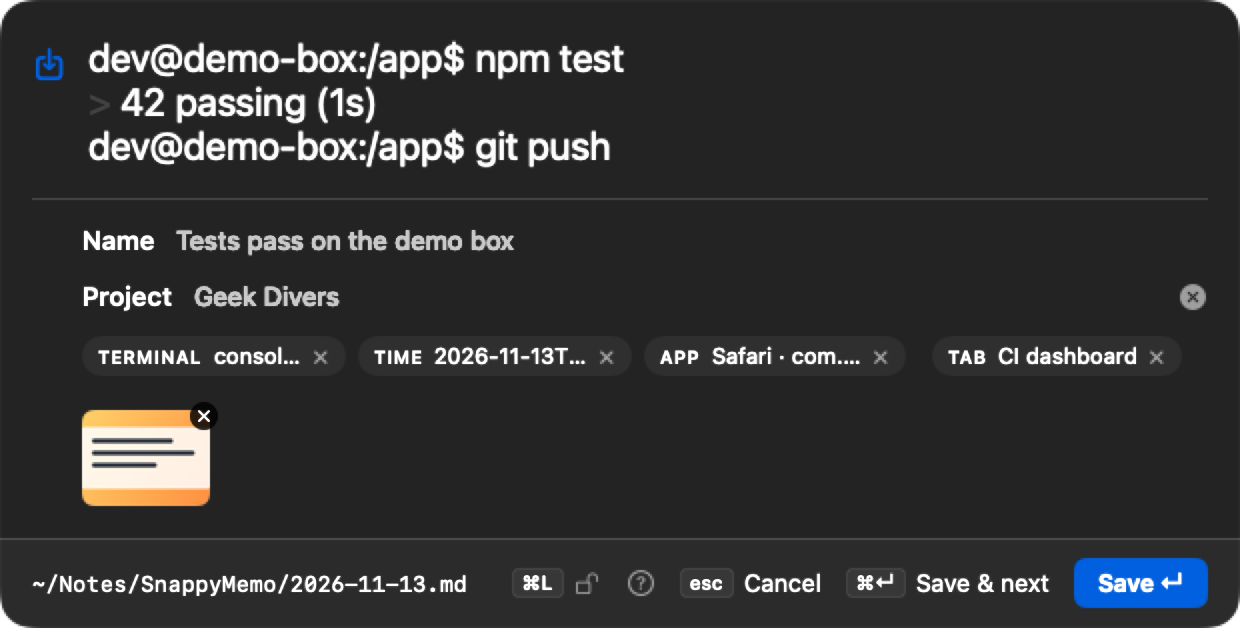
Control + Option + N (you can pick your own). A small panel appears, with whatever you last copied already filled in.
The note is saved with the time, the app, and the web page you were on. The panel disappears and you're back where you were.
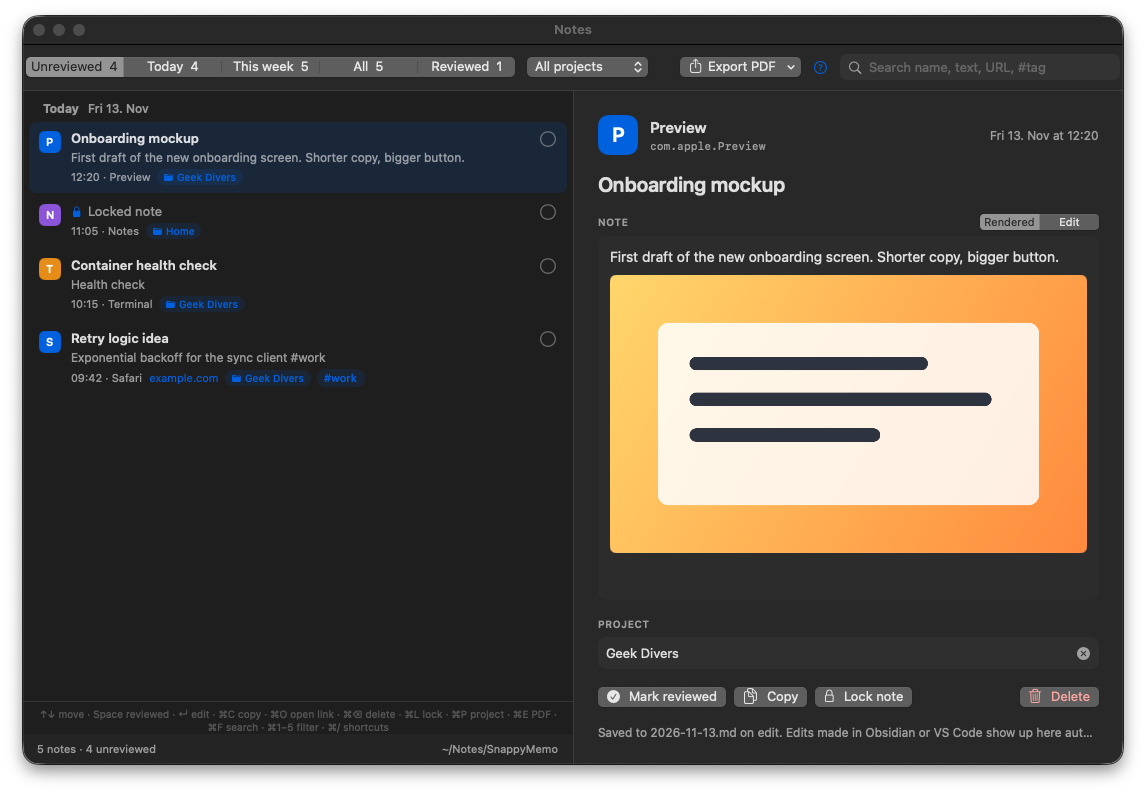
Open the Notes window to see what you collected. Edit, organize, tick things off. A gentle reminder at 6 pm helps you keep the inbox empty.
The Notes window
Everything you captured, in one place. Pick a note, edit it, tick it off.
The capture panel
What you see when you press the shortcut. Here with a pasted terminal session, a screenshot, and the browser tab picked up automatically.
Made for people who think while they work
Developers
Paste an error or a terminal session, and it's saved looking like your terminal. The link to the docs page comes along.
Students & researchers
Save a quote and its source in one go. Tag it #thesis and find it again in seconds.
Meetings & calls
Jot down an action item without leaving the video call. File it under the right project as you type.
Everyone else
Ideas, to-dos, gift ideas, a recipe link. Get it out of your head now, sort it out later.
Why it's different
Faster than any notes app
No app to open, no page to find. One shortcut, from anywhere, works entirely from the keyboard.
Remembers where it came from
The link and title of the page you were on are saved automatically in Safari, Chrome, Arc, Edge and Brave.
An inbox, not a pile
New notes wait under “Unreviewed” until you've dealt with them, so nothing gets lost at the bottom.
Your notes stay yours
Plain text files in a folder you choose. Open them in any editor, today or in twenty years.
Backed up where you like
Put the folder in iCloud Drive, Dropbox or OneDrive and your notes are backed up and on all your Macs.
Private, really
No account, no cloud of ours, no tracking. Lock sensitive notes and unlock them with Touch ID.
Is it for you?
Great if you…
- have ideas and links coming at you all day
- like the keyboard more than the mouse
- want your notes as files, not locked in an app
- already use Obsidian, VS Code or a Markdown editor (SnappyMemo fills the same folder)
Not the right tool if you…
- need an iPhone or iPad app (it's Mac only, for now)
- write long documents with layouts and fonts
- share notes with a team to edit together
Keep your big notes app for that. SnappyMemo is the quick inbox in front of it.
What a note looks like on disk
One file per day, readable by anything. This is the whole secret.
# 2026-11-13.md

## 09:42 Retry logic idea
Exponential backoff for the sync client #work

- project:: Geek Divers
- app:: Safari
- url:: https://example.com/backoff
- title:: Exponential backoff explained
- reviewed:: false
Everything it does
⚡ Capture
- One shortcut from any app (Control + Option + N), and you can choose your own
- Whatever you copied last is already filled in
- Give a note a short name if you like, it becomes the title
- Save and start the next note right away
- The panel grows with long text, and remembers the size you like
- Works without touching the mouse
🔗 Context, automatically
- When you wrote it
- Which app you were in
- The page link and title from Safari, Chrome, Arc, Edge and Brave
- Remove any of it with one click, or switch it off for good
🏷️ Tags & projects
- Type
#somethinganywhere and it becomes a tag - Put a note in a project, with suggestions as you type
- Typos don't split projects: “Geek Divers” and “geek-divers” are the same
- Your last project stays selected for two hours
- Rename or merge projects later, across all notes
✍️ Writing
- Notes look formatted (headings, lists, tables, links), and you can switch to plain text to edit
- A quick menu for headings, checklists, tables, quotes and code
- Lists continue when you press Return
- Bold, italic and links with the usual shortcuts
🖼️ Images & code
- Paste screenshots and images, or drag them in, several per note
- Full-size preview with one key
- Pasted terminal sessions look like a real terminal
- Code blocks with a Copy button
✅ Review
- Notes window from anywhere (Control + Option + R)
- Show Unreviewed, Today, This week, All or Reviewed, and filter by project
- Search everything: text, names, links, tags, projects
- Edit right there, tick notes off, undo if you ticked the wrong one
- Copy a note, open its link or delete it
- A daily reminder to review, at a time you choose
- Changes you make in other editors show up instantly
🔒 Locked notes
- Lock any note so other apps only see scrambled text
- Its images are locked too
- Unlock with Touch ID, your Apple Watch or your Mac password
- Locks itself again when you step away or your Mac sleeps
📄 Export & files
- Save one note, or a whole project or week, as a tidy PDF
- One plain text file per day, in the folder you choose
- Opens in Obsidian, VS Code or any text editor
- Works in iCloud Drive, Dropbox, OneDrive and other synced folders
🖥️ Feels at home on a Mac
- Lives in the menu bar, out of your way
- Starts with your Mac if you want it to
- Light and dark mode
- Using a Windows keyboard on your Mac? Shortcuts can be shown as Ctrl, Win and Alt (Strg on a German Mac), the way your keys are labelled
- All shortcuts listed in the app
Questions
Can I keep my notes in iCloud Drive or Dropbox?
Yes. On first launch you choose a folder, and that can be in iCloud Drive, Dropbox, OneDrive, Google Drive or any other synced folder. Your notes are then backed up and available on every Mac where you use SnappyMemo. Tip: set the folder to “Keep Downloaded” so older notes are always on your Mac.
Is there an iPhone app?
Not yet. SnappyMemo is made for the Mac. Because notes are plain files, you can read them on your iPhone in the Files app, or in Obsidian if you use it.
I use Obsidian. Does this work with it?
Very well. Choose a folder inside your vault and every note appears there as Markdown, with #tags Obsidian understands and fields its Dataview plugin can search. Use SnappyMemo to capture, Obsidian to think.
What happens to my notes if I stop using SnappyMemo?
Nothing. They're ordinary text files in your folder. Open them with any editor, forever. There's no export step because there's nothing to export from.
Does SnappyMemo send my notes anywhere?
No. The app has no account, no server and no analytics, and never sends your notes anywhere. The only thing it talks to is Apple's App Store, to check your trial or unlock. See the privacy policy.
Why does it ask to control my browser?
To read the link and title of the page you're on when you take a note. macOS asks for your permission once. It only reads the current tab, and you can switch it off in Settings.
I use a Windows keyboard on my Mac. Will the shortcuts make sense?
Yes, we've got you covered. Switch Settings › Keyboard to “PC keyboard” and every shortcut in the app is shown as printed on your keys: Ctrl for ⌃, Win for ⌥, Alt for ⌘. So ⌃⌥N reads Ctrl+Win+N.
Can I try it first? Is it a subscription?
Download it free and use everything for 30 days. If you like it, unlock it once for $2.99 and it's yours, including updates. No subscription. If you don't unlock, your notes stay readable and editable; only saving new notes stops.
Which Macs does it run on?
Any Mac with macOS 14 Sonoma or later, Apple silicon or Intel.
Try it free for 30 days.
Free for 30 days with every feature. Then a one-time unlock, no subscription. No account, no tracking, and your notes never leave your Mac unless you put them somewhere.
Coming soon to the Mac App StoreSupport
The shortcut doesn't work. Another app may already use Control + Option + N. Pick a different one in Settings.
No link is saved from my browser. Allow SnappyMemo in System Settings › Privacy & Security › Automation.
Where are my notes? In the folder you picked, one file per day. Settings › Notes folder shows it.
Something else? Write to support@snappymemo.com. A real person answers.